


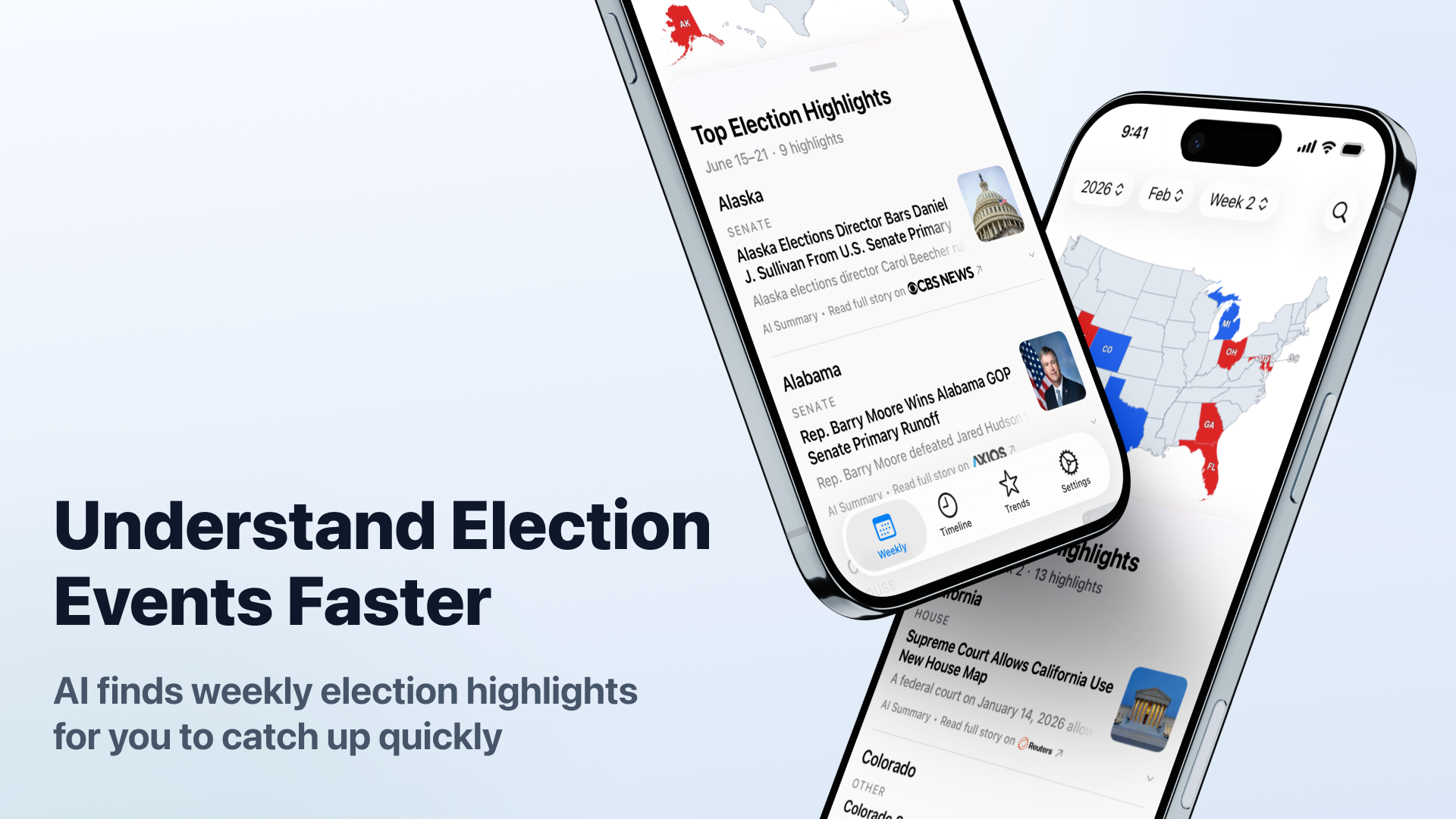
Project Background
When following U.S. elections, relevant information is often scattered across national media, local media, candidate updates, and election coverage from different states. Once elections enter primary, special election, or midterm stages, keeping track of what is happening in each state requires a significant amount of time to read and organize information from different sources.
Election Radar brings this information together on a single platform. It uses AI to search for and organize election-related events, then presents them by state, time, and event type, allowing users to quickly follow notable developments in U.S. elections.
Download Election Radar on the App Store
Core Features
The App uses GraphQL to retrieve reviewed election data, then organizes and presents event content based on different usage scenarios.
Interactive U.S. Map
The home page uses a U.S. map as the main entry point, allowing users to select different states and view current election events and related information for each state. After a state is selected, the page scrolls to the events and content related to that state.
This map-based presentation connects events directly with geographic locations, allowing users to explore ongoing election events by state without first knowing a specific candidate or election name.
Weekly Election Event Summary
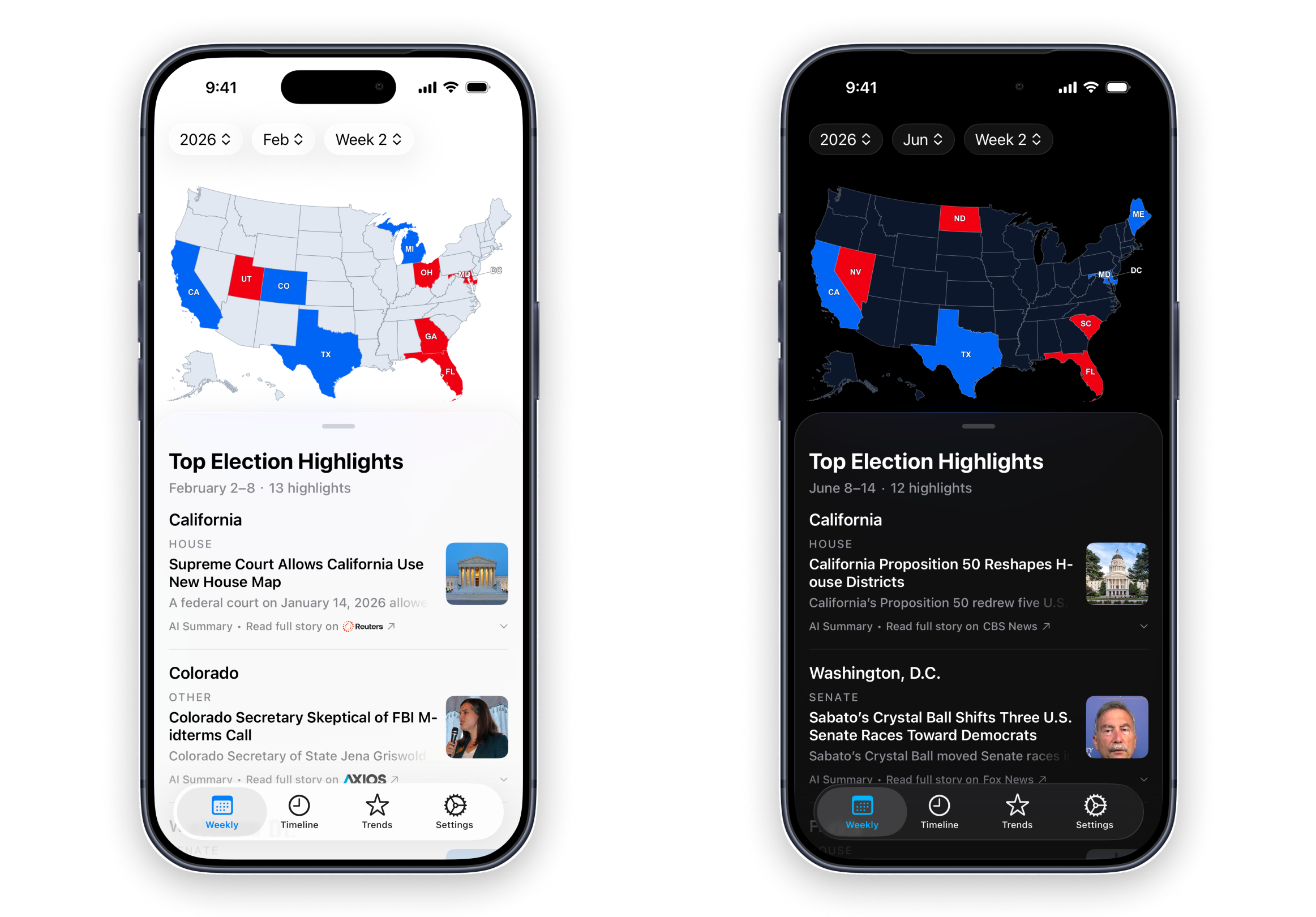
Election Radar organizes recent election developments by week, bringing together important election events from states across the U.S. Each event includes a headline, summary, and source, allowing users to quickly follow the major election developments during that period.
Each election event retains a link to its source, allowing users to go directly to the original source for the full report after reading the AI-generated summary.
Election Timeline
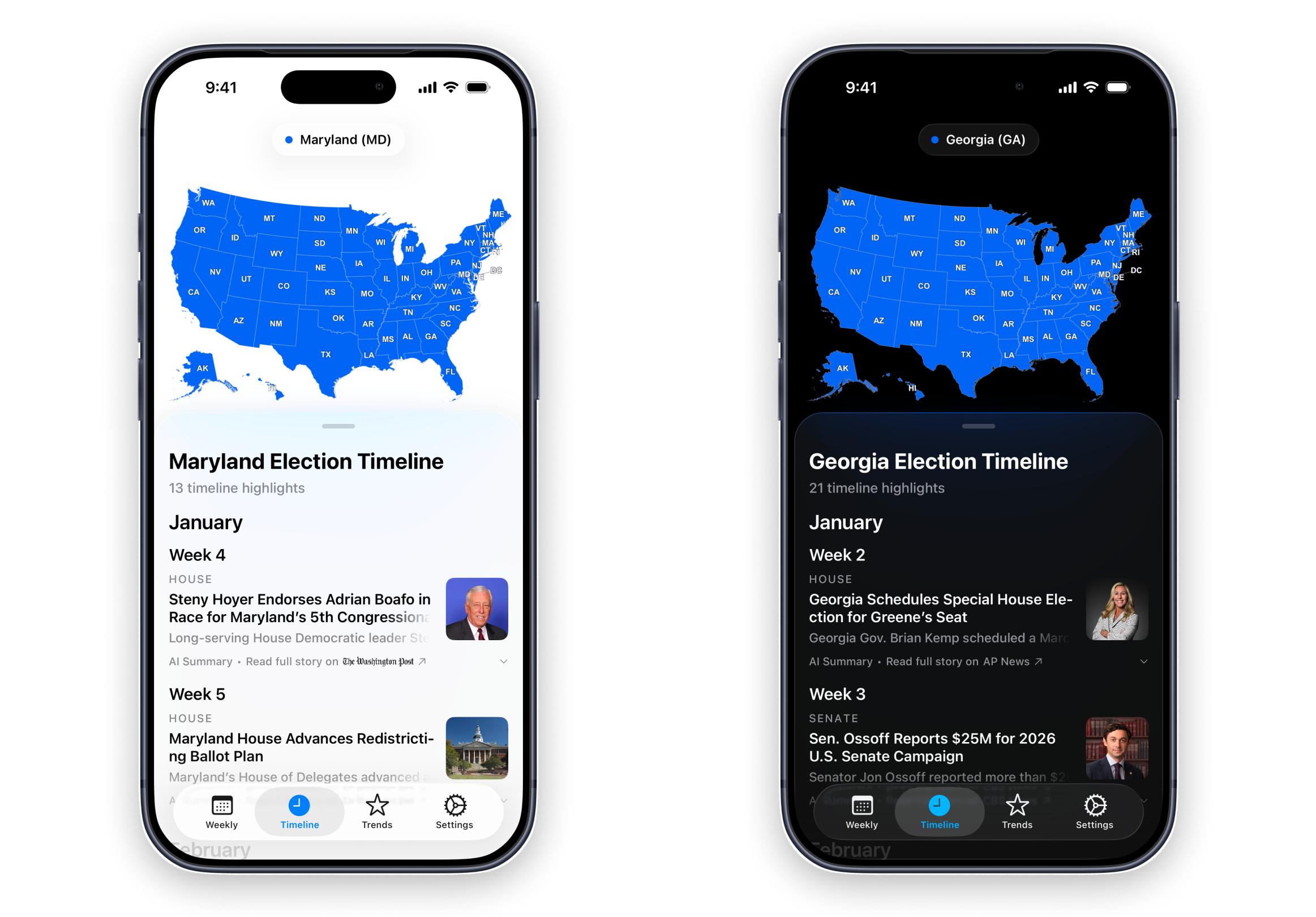
The timeline organizes election events for a specific state in chronological order, allowing users to browse developments from earlier events through the most recent updates.
The timeline uses the same event data as the weekly election content, allowing users to follow recent developments through the weekly summary or use the timeline to view election developments in a specific state over a longer period, such as candidate announcements, primary results, endorsements, court rulings, or other subsequent developments.
Election Trends
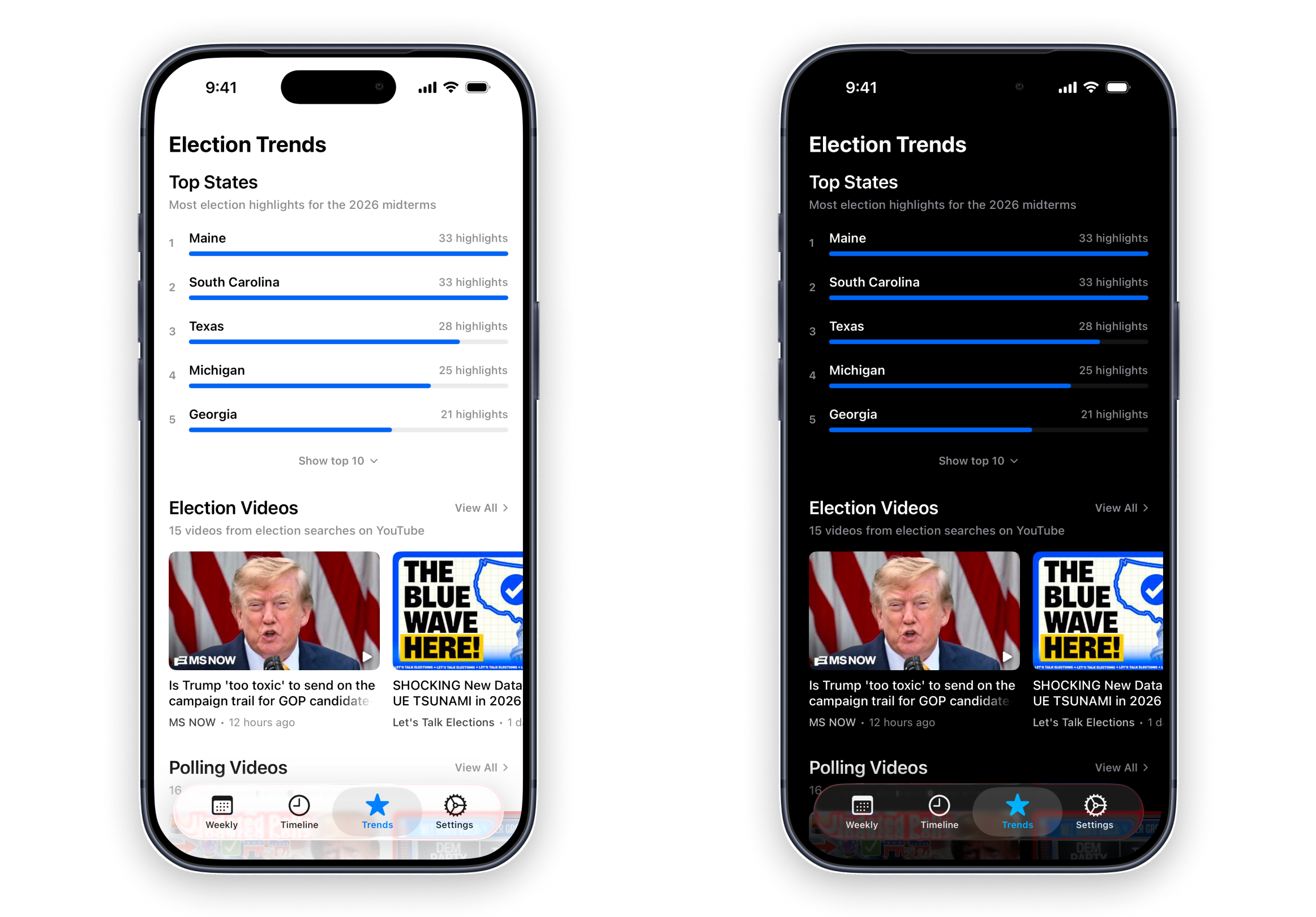
Election Radar also integrates state-level event statistics and election-related video content, allowing users to understand candidates, election events, and recent political developments through statistics and videos in addition to written event content.
Cross-Platform Development
Election Radar is developed with SwiftUI and uses the Skip framework to bring the same Swift / SwiftUI project to Android.
Skip enables Swift code to be shared across iOS and Android, mapping SwiftUI interfaces to Jetpack Compose on Android while preserving native execution on both platforms.
During development, some platform-specific features still need to be handled separately for iOS and Android. For example, WebView lifecycle and Render Process behavior are implemented differently on the two platforms, so these areas are handled through platform conditions and platform-specific implementations. While developing this project, I forked Skip's skip-web package and implemented support for a WebView termination issue that Skip did not yet provide customization for.
How Election Radar Works
Election Radar has an automated election event processing pipeline and a semi-automated review process, covering event collection, AI organization, data processing, and human review before approved content is made available in the App.
The overall process is:
- Google Apps Script starts the process on a scheduled basis
- AI collects U.S. election events from the current week
- AI organizes election event content and related data and produces structured output
- The system performs data processing such as event deduplication and image retrieval
- Data is marked as unreviewed and stored in the database
- A semi-automated human review is performed
- Approved data is marked as reviewed
- The App retrieves reviewed data and displays it to users
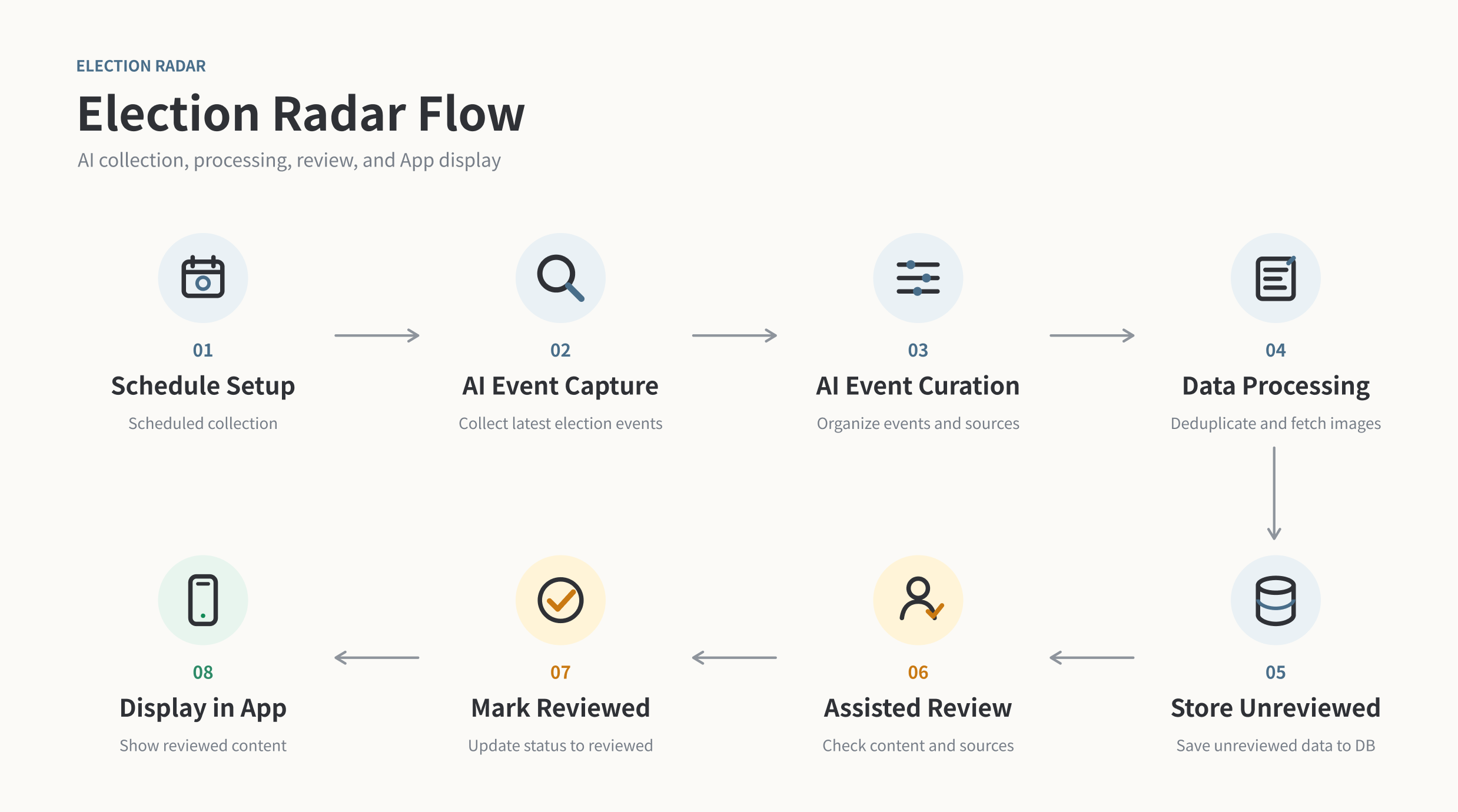
This process allows election events to be updated regularly while completing data organization and review before they enter the App, maintaining a consistent data format and content quality.
The backend handles the entire data processing flow from scheduled execution through database storage and review.
Google Apps Script starts the process according to the configured schedule, after which AI collects recent U.S. election events and organizes them into structured data used by Election Radar, including headlines, summaries, states, categories, and source information.
After AI processing is complete, the system continues with event deduplication, image retrieval, and other data processing before marking the results as unreviewed and storing them in the database. The data then enters a semi-automated human review process and is only marked as reviewed and made available to the App after approval.
Improving Data Retrieval Reliability with Redis
While retrieving data from Supabase, the backend sometimes encountered long response times and frequent 503 Service Unavailable errors. To reduce the impact of these service disruptions on the App, I introduced Redis as a caching layer. When the requested data is not cached, the backend retrieves it from Supabase and stores it in Redis. Once the cache is populated, subsequent requests retrieve the data directly from Redis. This allows cached data to remain fast and reliably available to the App even when Supabase responds slowly.
Source and Content Organization
The same election event may be reported by multiple sources, so the system also handles source selection and duplicate events during processing.
Election Radar uses the event itself as the main content unit and stores the corresponding sources, preventing the same event from appearing multiple times to users simply because it was reported by different sources.
Review Dashboard
The system marks events that have completed AI organization and data processing as unreviewed and provides a dashboard for semi-automated human review. Events that complete the review process are marked as reviewed before being made available for display in the App.
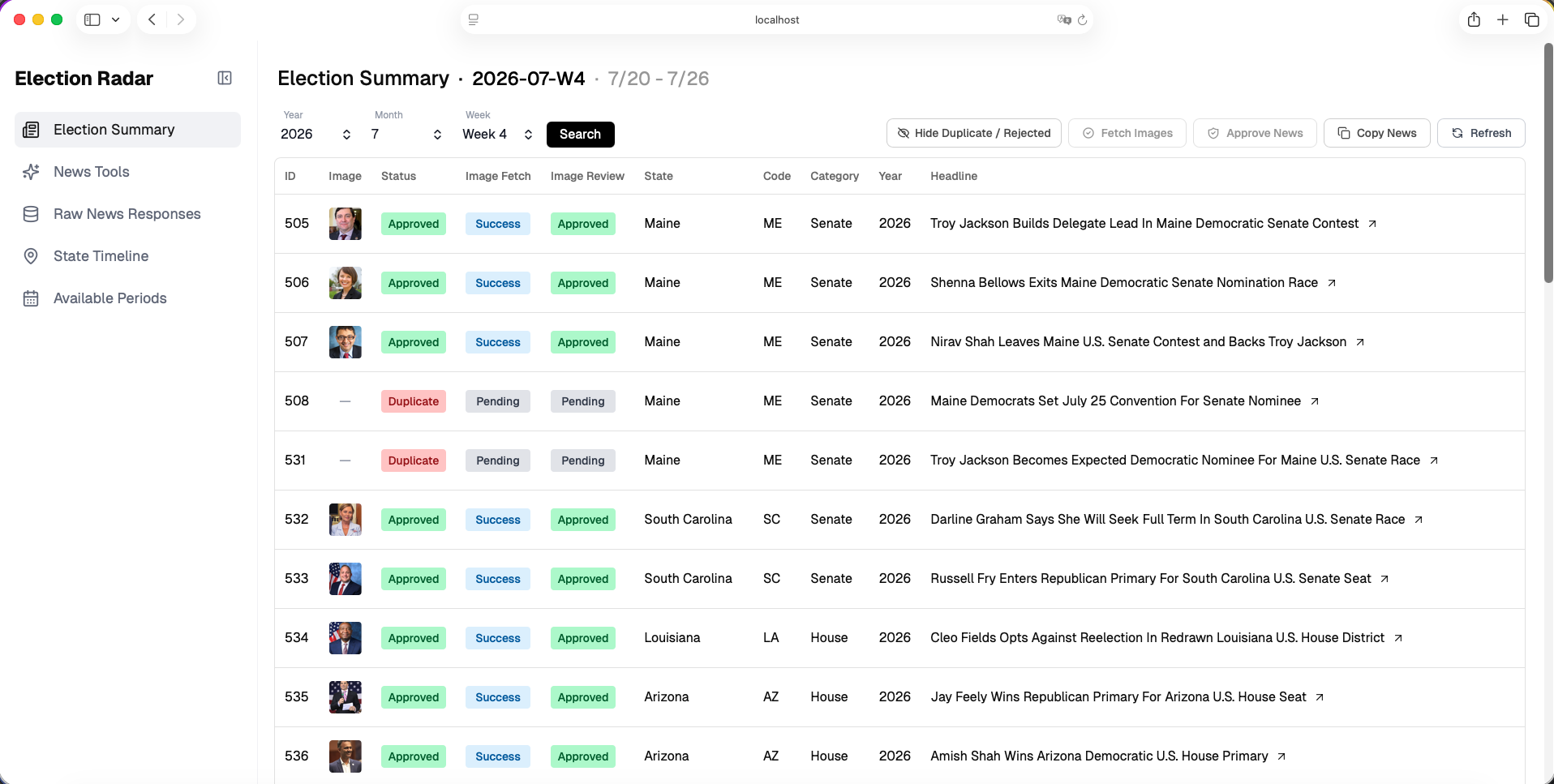
Image Sources and Licensing
Election events in Election Radar are usually paired with images of people, government institutions, or related locations. Image sourcing takes content relevance, usage cost, and user trust into consideration.
General free stock photo libraries are easy to access, but their content is often broad and generic, making it difficult to find images directly related to specific candidates, political figures, or election events. AI-generated images provide greater flexibility, but generating them at scale increases costs and can also affect users' perception of trust when used in a news and election information product.
Election Radar therefore uses Wikimedia Commons as its primary image source. Many political figures, government institutions, and public buildings have corresponding Wikipedia pages and Wikimedia Commons images, allowing events to be paired with images of the actual people or locations involved.
The system first finds the corresponding Wikipedia page, then retrieves the related Wikimedia Commons image along with the image author, license, and other attribution information. Because different images may use different licensing terms, Election Radar stores and displays complete attribution information so that each image can be used according to its original license requirements.
Core Highlights
Semi-Automated Review Process
Most repetitive work in Election Radar's data flow is handled automatically by the system, including scheduled execution, event collection and organization, deduplication, image retrieval, and database writes.
Once the review stage begins, another AI Agent performs an initial check before a human confirms the event content, summary, source, and related data. Human review serves as the final review step. Once the content is confirmed for publication, it is marked as reviewed, and the App retrieves and displays the data.
This semi-automated process reduces the amount of work that needs to be handled item by item while retaining human confirmation to prevent AI-generated errors from entering the App directly.
UI Design
Information Hierarchy Design
Election Radar's interface prioritizes "state" and "event headline" in its information hierarchy, allowing users to quickly understand important election events happening across different locations as they scroll through the content.
When users are interested in a specific event, they can expand it to read the AI-generated summary; when they want the full details, they can continue to the original source.
Gradient Fade
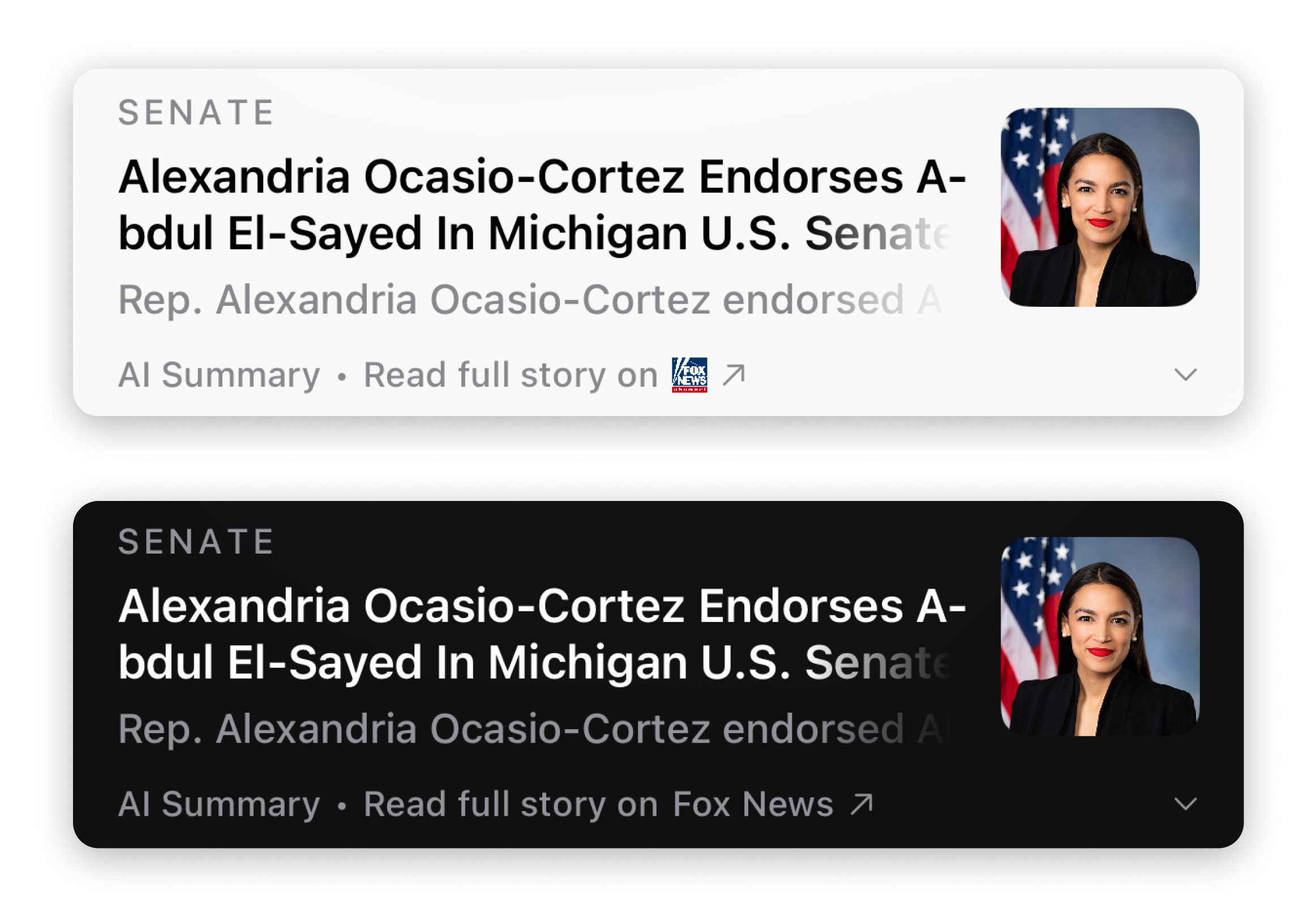
The system normally uses an ellipsis "…" to indicate text that extends beyond the available display area. When multiple event headlines in a list exceed the length limit, repeated ellipses appear throughout the interface, making the ends of the list items visually cluttered.
I therefore built a custom component that automatically applies a gradient fade mask to the end of text when it exceeds the specified display range. The gradient indicates that additional text continues beyond the visible portion while avoiding repeated ellipses throughout the list.
Developing with Codex
Integrating Codex Into My Development Workflow
When developing a new feature, I usually start in the ChatGPT app and use dictation to speak through my ideas. I first discuss with ChatGPT whether the feature makes sense, what concerns or open questions there are, and where it could be improved. Because Election Radar involves U.S. elections, I also bring in the domain knowledge I have built from regularly following American politics, then combine that with ChatGPT’s input to gradually shape the feature direction. Since Codex consumes more tokens while ChatGPT gives me more available usage, I usually keep this early-stage feature discussion in ChatGPT.
Once the direction is clear, I move into Codex. Because the codebase is fairly large, I explicitly tell it which feature areas and existing components to read first, so the context stays focused on the current task and it does not recreate or reimplement something that already exists in the project. Before implementation begins, I ask it to explain the proposed approach, identify which files need to change, and provide a rough example of what the main code sections would look like. I then review the approach and complexity while also defining the expected behavior and test cases up front. Some requirements can be completed with only a small amount of code, so reviewing the implementation approach first helps prevent the Agent from introducing unnecessary structure and reduces the amount of code I need to review later. Defining the test cases in advance also allows the later testing process to be evaluated directly against the original feature requirements.
Because Codex performs context compaction as its context approaches the limit, I handle larger features by first explaining the overall direction and how I plan to split the work into smaller parts. In practice, I only ask it to work on one part at a time, and move to the next only after the current one has been completed and verified. I provide the detailed requirements for each smaller feature only when it is actually time to implement it.
After Codex finishes the implementation, I ask it to run the test cases we defined earlier and confirm that the feature achieves the expected behavior before reporting the result. For UI-related work, I also let the Agent interact with the simulator to validate the feature. I then review the actual changes against the implementation direction we agreed on earlier, including which files were modified, how the solution was implemented, and whether the final behavior matches the expected result. I care a lot about UI animation and transition details, and while the Agent can verify whether the feature works correctly, it is much harder for it to accurately judge whether every animation and transition feels smooth in actual use and matches my expectations. For that reason, I still run the feature on a physical device myself to verify the overall functionality, interactions, and actual user experience.
If testing reveals an issue, I describe the intended behavior again and compare it with the actual result, attaching screenshots when necessary, then let Codex continue refining the implementation based on that information. Once the feature is complete, I have the Agent draft the commit message based on the actual changes, and I review it to make sure it accurately reflects what was changed.
Using Codex to Solve Development Problems
While developing the Android version with Skip, the way a screen appeared or a component behaved sometimes differed from what I expected, even though the code syntax was correct and there were no compilation errors. This kind of situation usually required searching the documentation and even reading and tracing the framework's source code to determine whether the result came from an implementation issue or matched the behavior expected by the framework.
During the development of Election Radar, I had the Agent read the relevant Skip source code directly and analyze the implementation, helping confirm whether the situation involved a problem or matched the behavior expected by the framework. When the current behavior followed the framework's design but differed from how I wanted it to appear on Android, I described the desired UI presentation and had the Agent find a suitable implementation approach from the source code and API. I then used conditional compilation to handle the required behavior separately for iOS and Android. This saved considerable time when reading and tracing source code and made the process of resolving cross-platform development issues more efficient.